Start with a 1440 × 1800 px canvas for a portrait feed ad and a 1440 × 2560 px canvas for Stories. Both have the same width. A centred crop from the second canvas to the first removes 380 pixels at each end.
Choose a canvas
| Placement | Ratio | Canvas, px |
|---|---|---|
| Portrait Facebook or Instagram feed ad | 4:5 | 1440 × 1800 |
| Full-screen Stories image | 9:16 | 1440 × 2560 |
| Square version | 1:1 | 1440 × 1440 |
These are the working dimensions of our templates. Available sizes depend on the ad format and placement. Export photos as JPG, or use PNG for artwork with text and fine lines.
What a centre crop cuts off
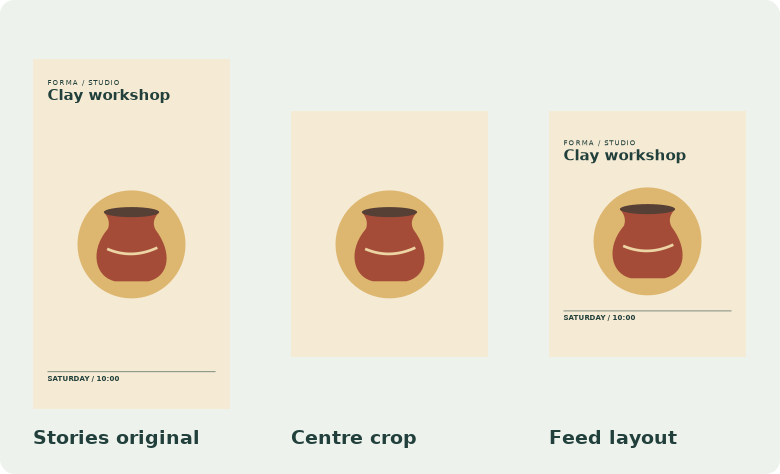
The vase survives the crop in the middle, but the viewer loses both the name of the event and its start time. The feed layout on the right moves those details inside the smaller frame. Read the whole poster at phone size and check that the placement controls leave the important text visible.
Use the editable templates
- Unzip the files. Open the SVG for your placement in Figma, Inkscape or another vector editor.
- Replace the illustration, title and time. Check line breaks on each canvas.
- Export as JPG or PNG and preview Feed and Stories separately in Ads Manager.
Download three editable SVG templates (ZIP)
You can create the source illustration in FB Studio. See our examples of using the Facebook name in ad copy.
Meta placement specifications
Check the specifications for Facebook Feed, Instagram Feed and Stories. Meta may ask you to sign in.